
In short: Cl@ve is Spain's official electronic identification system for online procedures with public administration. It allows foreigners with TIE/NIE to access AEAT (taxes, IEDMT, DUA), DGT (registration, fines), Social Security (health card, benefits), SEPE (unemployment), regional and municipal authorities, without going to offices. It's free. With a TIE/NIE, online registration without a certificate goes through an invitation letter, which arrives by post. If you are after a digital certificate with NIE in Spain, the most common one with an NIE or TIE is the FNMT Electronic Certificate, further below; you sign with it using AutoFirma.
In person or by representative? With a TIE/NIE you register Cl@ve online with an invitation letter (sent by post) or with an electronic certificate, or in person at a registration office. Video identification is, for now, only for Spanish citizens with a DNI. The FNMT certificate does require one in-person accreditation (by appointment, usually at AEAT). Cl@ve registration is personal, with no representative; for the FNMT, someone else can go on your behalf only if you first have your signature on the certificate contract certified by a notary.
Three Cl@ve modes
- Cl@ve PIN: one-time code sent by SMS or app, valid for a session. Simple, no permanent password.
- Cl@ve Permanente: username + password + SMS second factor; the password expires after 2 years and must then be changed. For frequent use.
- Cl@ve Móvil: authentication via the official Cl@ve app (formerly Cl@ve PIN) on your phone, the most convenient.
Once registered, all three modes are available: you pick which to use for each procedure.
📶 Just arrived? Cl@ve sends its codes by SMS, and several procedures ask for a mobile number. A Spanish eSIM gives you a number and data from day one, with no contract or prior padrón — one option is Sim Local. 🤝 Our partner. (Cl@ve itself is free.)
FNMT Electronic Certificate (Fábrica Nacional de Moneda y Timbre), alternative or complement: a digital file (.pfx/.p12) installed in your browser or device. More powerful (allows digital signatures), universally accepted, but requires in-person verification during application.
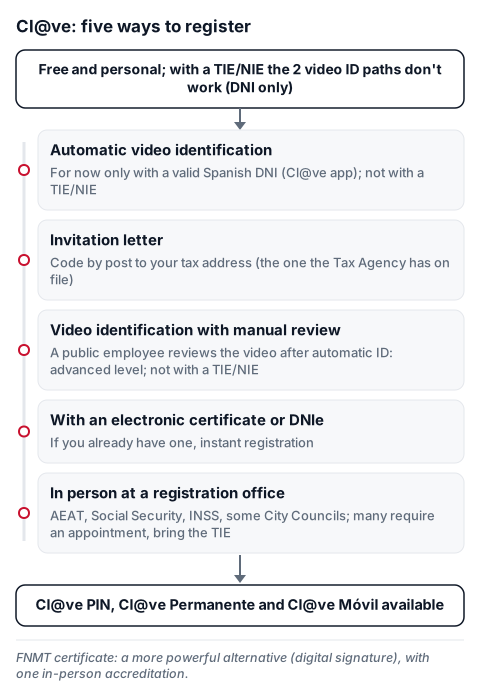
How to register Cl@ve (5 paths, deep links per path)
Index page: clave.gob.es: How to register.
- Automatic video identification: for now only for Spanish citizens with a valid DNI; it is not available with a TIE/NIE. It is done in the Cl@ve app (formerly Cl@ve PIN).
- Invitation letter: if you don't have an electronic certificate, this is the online path with a TIE/NIE. Request it from the link above and you receive a postal letter with a code at your tax address (domicilio fiscal), the address the Tax Agency has on file, which may not be your padrón address. The code in the letter is valid for 60 days after you receive it. Then enter the code at clave.gob.es to complete. You need a mobile phone; a foreign number with the country prefix is accepted.
- Video identification with manual review: after a successful automatic video identification, a public employee reviews the video and you get the advanced level. It depends on video identification, so for now it doesn't work with a TIE/NIE either.
- With existing electronic certificate or DNIe: if you already have one, use it to register Cl@ve instantly.
- In person at a registration office: AEAT, Social Security, INSS, some City Councils. Many offices require an appointment. Bring TIE.
How to get FNMT Electronic Certificate (4 sequential steps)
- Step 1 — Prior configuration: install the FNMT software/configurator in your browser (Firefox/Chrome). Required before next steps.
- Step 2 — Request certificate: enter NIE/TIE + create a password (write it down, it can't be recovered). Receive the request code by email.
- Step 3 — Accredit identity: appointment at authorised office (mainly AEAT). Office list on this same page. Bring TIE + passport + request code.
- Step 4 — Download certificate: ~1h after accreditation. With your code + NIE + password created in step 2. It installs automatically in your browser. Save a backup copy (.pfx).
- Expiry: 4 years. Online renewal is only possible in the 60 days before expiry. If you have already renewed once, for the next certificate you must prove your identity in person again (a new application as in steps 1-4; at the office, TIE, passport and request code).
AutoFirma: what it is and how to download AutoFirma
AutoFirma is an electronic signature app from Spain's digital transformation ministry. You pick the file you want to sign and the program chooses the signature format on its own. It does not replace the certificate: AutoFirma signs with your digital certificate or your DNIe, so you need one of the two first.
- Open the official downloads page: firmaelectronica.gob.es, Downloads.
- Choose your system: Windows, macOS or Linux (Debian, Fedora and OpenSUSE). For Android and iOS there is the "Autofirma Apps" app on Google Play and the App Store. There is a separate version for older macOS; the page says so.
- Install it with the user installation manual linked on that same page. When you sign on an electronic office, AutoFirma can run from the browser.
Where AutoFirma is asked for in immigration procedures: on Mercurio, the Public Administrations office asks you to have AutoFirma installed to sign the form and the attached documents before registering the application. In other procedures, AutoFirma comes up when the office asks you to sign with a certificate.
What it's for
- AEAT: forms 05/06/576 (IEDMT), IRPF declaration, tax certificates.
- DGT: registration appointments, miDGT, fines, temporary vehicle deregistration.
- Social Security: TGSS (self-employed registration, work history report, which can also be requested by SMS or by post without Cl@ve), INSS (pensions).
- SEPE: unemployment benefits, training courses.
- City Council: padrón, IBI, IVTM, local aid.
- Autonomous communities: health, education, regional aid.
Official source: Cl@ve — Electronic identification system + FNMT — Individual certificate.
Informational only; check the official source for your specific case.
